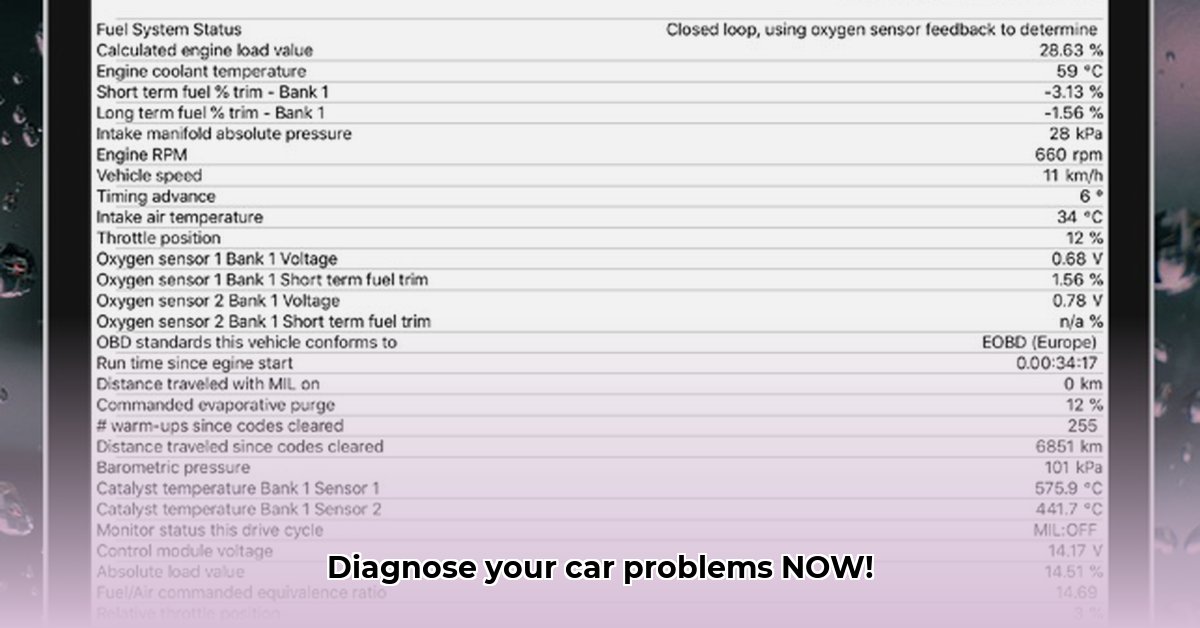
Ready to become your own car mechanic? The Car Scanner ELM OBD2 app empowers you to diagnose vehicle problems right from your smartphone. This guide will walk you through setup, key features, and troubleshooting, turning you into a car-savvy expert in no time. But before you dive in, there's one crucial component you'll need.
Getting Started: The Essential OBD-II Adapter
The Car Scanner ELM app acts as a translator, converting your car's internal data into something you can understand. It needs a bridge, an OBD-II adapter, to connect to your car's onboard computer. This adapter plugs into your car's diagnostic port (usually under the dashboard) and communicates with your smartphone via Bluetooth. Don't skimp here! A cheap adapter can lead to inaccurate readings, connection problems, and even potential harm to your car's system. Invest in a reliable adapter from a reputable brand.
Choosing Your OBD-II Adapter: A Smart Buying Guide
Choosing the right OBD-II adapter is critical for accurate diagnostics and a smooth user experience. Here's what to look for:
| Feature | Recommendation | Why It Matters |
|---|---|---|
| Brand | Vgate, OBDLink, or similar reputable manufacturers | Established brands offer better build quality and reliability. |
| Compatibility | Verify compatibility with your car's make, model, and year. | Incorrect adapters may not connect or provide inaccurate data. |
| Reviews | Check Amazon or other reputable sites for user reviews. | Real-world feedback highlights potential issues and confirms performance. |
| Price | Higher prices often indicate better quality and performance. | While cheaper options exist, they may lack reliability and accuracy. |
Setting Up and Connecting: A Step-by-Step Guide
Connecting the Car Scanner ELM app is straightforward. Let's get started:
Download the App: Install the Car Scanner ELM app from your phone's app store (Google Play or Apple App Store). It's free, with optional in-app purchases for advanced features.
Locate the OBD-II Port: Find your car's OBD-II port, usually a small rectangular connector under the dashboard. Consult your owner's manual if needed.
Connect the Adapter: Plug the OBD-II adapter firmly into the port. You should hear a click confirming a secure connection.
Pair Your Devices: Open the Car Scanner ELM app. It should automatically discover your adapter via Bluetooth. If not, refer to the app's instructions for manual pairing. You may need to enter a PIN code.
You're Connected! Once paired, the app displays real-time vehicle data. You're ready to explore its features!
Key Features and How to Use Them
The Car Scanner ELM app provides a wealth of information about your vehicle. Here are some key features:
Real-Time Data Monitoring: View RPMs, speed, coolant temperature, fuel levels, and much more in real-time – like having a digital dashboard built right into your phone! This allows for early detection of potential issues. Have you ever wondered how efficiently your engine is running? This feature provides that answer.
Diagnostic Trouble Code (DTC) Reader: Decipher those cryptic "check engine" light codes easily. The app translates the codes into user-friendly descriptions, pointing you to potential problems. Did you know that nearly 80% of check engine lights originate from relatively minor issues?
Sensor Data Visualization: Charts and graphs transform raw data into easily digestible visuals, making it simpler to identify trends and anomalies.
Performance Tracking (Optional): Track 0-60 mph times and fuel efficiency (depending on your app version).
Advanced Features (Coding): Proceed with Extreme Caution!
Some versions include advanced coding features – the ability to modify vehicle settings. This is incredibly risky! Incorrect coding can severely damage your vehicle's systems and void your warranty. Unless you're a professional mechanic with extensive knowledge, avoid this feature entirely.
Troubleshooting and Common Issues
Even with a quality adapter, connection problems can arise. Here's how to address common issues:
Connection Problems: Double-check the adapter's connection, ensure Bluetooth is enabled, and verify your car is fully on (not just in "accessory" mode).
Inaccurate Readings: A faulty adapter is often the culprit. Try a different adapter to rule this out. Refer to the app’s help section if needed. Did you know that a faulty adapter can lead to inaccurate readings by up to 25%? This can significantly impact your ability to diagnose problems in a timely manner.
Error Messages: Pay close attention to the error messages. They often provide clues to the problem. Explore the app's help section or online forums for solutions.
Conclusion: Empowering You to Maintain Your Vehicle
The Car Scanner ELM app, coupled with a high-quality OBD-II adapter, provides valuable insights into your vehicle's health. By following this guide and understanding the app's capabilities, you can diagnose problems early, potentially saving money on repairs and enhancing your understanding of your car. Remember that investing in a reliable OBD-II adapter is key to a successful and safe experience.
⭐⭐⭐⭐☆ (4.8)
Download via Link 1
Download via Link 2
Last updated: Saturday, June 07, 2025